
August Product Updates: Centralized Contact cards, public events & smarter search
We're back!✨ It's been a longer stretch than usual since the last Product Update with summer holidays and our code freeze got in the way, but of course we love to keep busy behind the scenes, so there's quite a lot new really cool updates we think will make your days easier!

June Product Updates: NEW features, FRESH updates & more.
This month is all about giving you more control over how your content looks — and a much smoother way to get media into the platform. We're introducing a brand-new Columns component, fully customizable footers for Media Center and Website, fresh layout options for your lists and schedules, and a radically simpler upload experience in Mediabank.
May Product updates: Smarter admin workflows, safer sharing & faster search
This update brings improvements across Screening Room, Mediabank, Program Catalog and Media Center Pages, focused on saving admin time, improving content accuracy, strengthening compliance, and making shared content easier to manage across organizations.
March Product Updates: Website – now with Pagebuilder
This month, we’re making it easier to publish, manage, and scale your content across teams and sites. With the upgrade of Website, a new way to build fully public-facing sites, and shared content components across organisations, you can now simplify your setup while reducing duplication. Alongside this, we’ve made a range of improvements to Mediabank, tagging, accessibility, and overall usability.
February Product Updates: an extensive list of new features
This month, we’re introducing dedicated Page statistics, a brand-new Contact form component in Page Builder, smarter tag management, extended API capabilities, and major performance improvements in Schedules. We’ve also improved publishing clarity, strengthened automatic design adaptability, and resolved several important issues affecting media display.
Product Updates: New File Support, Accessibility & Design Improvements
With the start of 2026, we’re kicking off the year with a set of upgrades and fixes designed to improve usability, accessibility, and overall workflow efficiency. These updates include document support in Mediabank, improved focus handling for accessibility, refreshed contact cards, expanded subtitle language support in Screening Room, and multiple fixes across tags and video playback.

Product Update – December 2025
Welcome to our final Product Update of 2025. As we wrap up the year, we’re closing strong with updates that improve security for enterprise teams, streamline content workflows, and make everyday editing in Admin a little smooooother. Here’s what’s new this month. Single Sign-On (SSO) – now available in Admin Support for Single Sign-On is now live in Admin for customers using external identity providers such as Azure AD, Okta or Google Workspace. Login is handled entirely through the customer’s own authentication system, improving security, access control, and onboarding. With SSO enabled: Users simply login with their existing corporate credentials, no new username or password needed Password and account management stay fully within the customer’s IT team Users automatically gain access to all authorised accounts SSO and traditional email/password login can run in parallel This update strengthens security, streamline user management, and helps customers meet internal IT policies and compliance standards. SSO is enabled per customer on request. Pagebuilder text editor: Highlight white text When background colours were introduced for components in Pagebuilder, many users began using white text, which could be difficult against the white editor background. inside Admin’s white text editor. To make white text easier to work with, we've introduced several ways to create contrast in the editor. You can add a background color before writing your text, and it will be reflected directly in the editor. I you're adding overlay text to an image or video, you can enable the background overlay (via the toggle in the image or video component) to visualize white text more clearly. Pull From Program Catalog – New Selector We’ve rebuilt the interface for pulling content from your Program Catalog into Media Center posts and Screening Room assets. The new selector gives you: Faster navigation Better search A clearer overview of available videos and assets A smoother way to add content or send as a screener This update makes it much easier to build posts and work with catalog content at speed. That’s a wrap for December! We’re already working on new improvements for early 2026, and we can’t wait to share what’s next. If you have suggestions or want to enable any of the new features, feel free to reach out at support@clipsource.com
Product Update – November 2025
This month’s small but mighty update brings a revamped image preview, a more intuitive Mediabank workflow, and several quality-of-life fixes across Clipsource. Here’s what’s new.
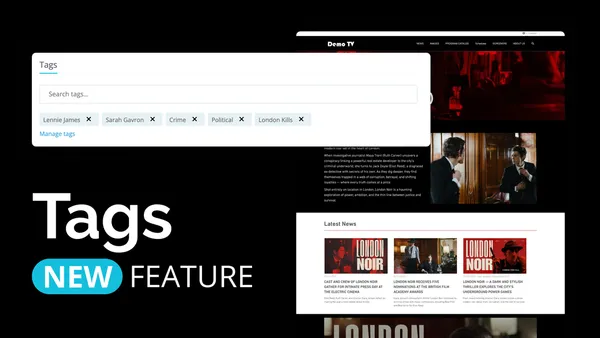
Product Update: Tags! You're it
Winter’s rolling in, but we’re keeping things warm with a batch of fresh updates, and this one, comes with a real game changer. We’re introducing Tags: a new, easier, and more powerful way to connect related content across Clipsource. With Tags, the old Presskit feature in Screening Room is replaced, making it possible to create dynamic collections that automatically update whenever new content is added.
Product Updates: October 2025
Bye Spooky season, Hi November! For this past month we have a round-up of new enhancements that make working in Clipsource smoother, faster, and a little more enjoyable. From better image control to smarter automation and improved playback, here’s what’s new across the platform:
Product Updates: September 2025
As the days get shorter and the leaves begin to turn, we’ve been busy tidying up and adding new improvements across the Clipsource platform. As always, all our updates are meant to make your work cleaner, faster and easier. Here are the new features, exciting upgrades and fixes we are launching this fall season with:
Post-Summer Product Updates: New Premieres components & some great updates
Summer is over, but we are still rolling out a set of new features and refinements across Media Center, Mediabank, and Schedules. These updates are designed to make content presentation more engaging, file management more flexible, and everyday workflows smoother and easier to understand.